What the owner sees and does in FollowStack
The owner starts on Home, sees what needs them, checks the money and the pipeline, and leaves the rest to the people who run it. Roles decide what everyone else can see.
Step by step
Start the day on Home
Home lists what needs you today, the visits your crews have booked, the money collected this week and the open pipeline. AI suggestions rank the calls and follow-ups worth doing first.

Watch the pipeline and who is selling
The pipeline board scores each deal and weights the total by stage. The scoreboard shows each person's new leads, proposals sent and signed, close rate and commission.

See which sources send junk
Lead quality by source counts each source's leads, spam and leads not worth it, so you can see which paid sources send junk and where to ask for a credit. The blocked senders list sits in Settings.

Check the money
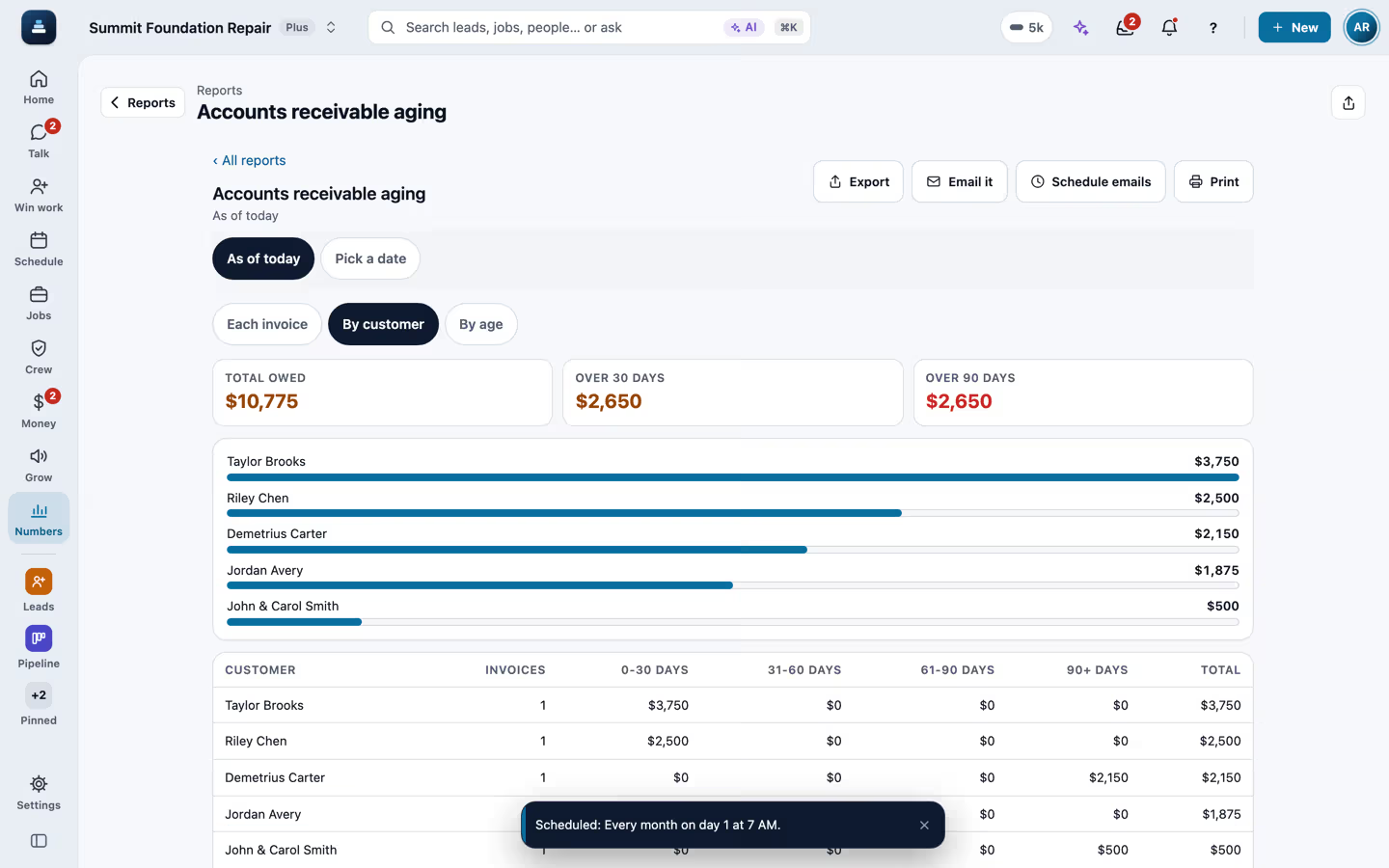
Invoices show what is outstanding and overdue and what came in this month. More than 35 reports cover sales, aging, profit and loss, cash flow, sales tax and 1099 vendors.

See how fast customers hear from you
Nine Customer engagement reports, such as Speed to lead and Response times, show how fast each new lead heard from a person, how fast the team answers and which proposals and invoices customers opened.

Choose what each role can do
You invite the team and pick each person's role, from the office and salespeople to estimators and the field crew. Roles decide which screens, money and customers each person sees, and you can change what a role may do.
Ask the assistant
The built-in assistant knows the screen you are on, your records and your settings. Ask how many leads came from each source, or have it finish tasks or change a record. A change it proposes after reading customer records waits as a card for your OK, and the card names everything it will start.

Recorded in FollowStack with demo data. Names, addresses and numbers are made up. The AI words come from a test stand-in, written the way the real feature drafts them, and no real texts, calls or emails were sent.
The guides for it
Each guide in the FollowStack manual is a few short steps with a screenshot.
- Finish Quick setupA short stepper that shows only what is still missing. Stop any time and pick up at the same step.5 min
- Turn on what is worth havingOne page with a switch for each feature most companies want on, and a shortcut to the rest.3 min
- Set up your workspace in 10 minutesYour phone line, how calls are answered, your team and your first leads.10 min
- Invite your teamAdd office staff and crews, each with a role. Seats are counted as office or field.3 min
- Choose what each role can see and doNone, View, Edit or Delete for each screen and action, checked by the server. Make your own roles.4 min
- See who is selling and pay commissionOne board with each person's new leads, proposals sent and signed, close rate and commission.2 min
- Run reports and send them to your team and your CPASales, purchases, what customers and vendors owe, profit and loss, taxes and hours, as Excel, Word, PDF or CSV, by email now or on a schedule.4 min
- Your plan, credits and seatsThe credits AI work uses each month, what is left, and the office and field seats in use.2 min
- Give every new lead an ownerNew leads go to your people in turn or by service, they get an alert, and you see who answers fastest.3 min
- Download all your company dataOne file of every record, with secrets stripped. Owners only.2 min
- Mark spam and leads not worth itPut junk and leads you will not work with out of the way. Nothing automatic goes to them, and the spam check learns from your marks.3 min
- See how your customers engage and how fast your team reaches themReports under Customer engagement: minutes to the first reply for every new lead, how fast each side answers, every text, email and call, what customers opened, your sales funnel, the best time to reach them, how they pay, and reviews and referrals.2 min
- Ask FollowStack to find, change or count anythingAsk AI and the Assistant read your records and setup, take you to any screen, and do the work. A delete or a settings change waits for your OK.2 min
Keep going
Job costing and reports for your CPA
What each job costs and earns, and the reports your accountant asks for, sent every month.
See the stepsA call turned into a signed proposal
The missed call gets a text, the visit is booked near the address, and the proposal is signed on site.
See the stepsCrews and scheduling
The office books the crews, and the crew runs the day on the phone.
See the stepsExport any list
Every list exports the way you filtered it, to Excel, Word, PDF or CSV.
See the steps
See FollowStack on one of your own jobs
Bring an address you're bidding this week. We'll draw it and price it with you, live on the call.