Schedule the crews and let them run the day on their phones
The office books crews on the board and sees who is on the clock. The crew opens Today on the phone, clocks in, starts the visit and closes it out with the install log the proposal already filled.
Step by step
Put the sold jobs on the crew schedule
Crews are your people grouped the way they work, with a lead and a daily capacity. A sold job goes on a crew for the days it needs, and you move a visit by dragging it to another crew or day.

Dispatch sees the whole day
Dispatch lists today's visits by crew and in order, shows who is on the clock and where, and keeps work orders without a crew on the side. Best order puts a crew day in the order with the least driving, with the miles saved and new start times to check before saving.

The crew clocks in on the job
Today shows the crew's jobs with Navigate, On my way and a call button. Clock in asks which job, and each punch keeps one location reading.

Close out with the install log
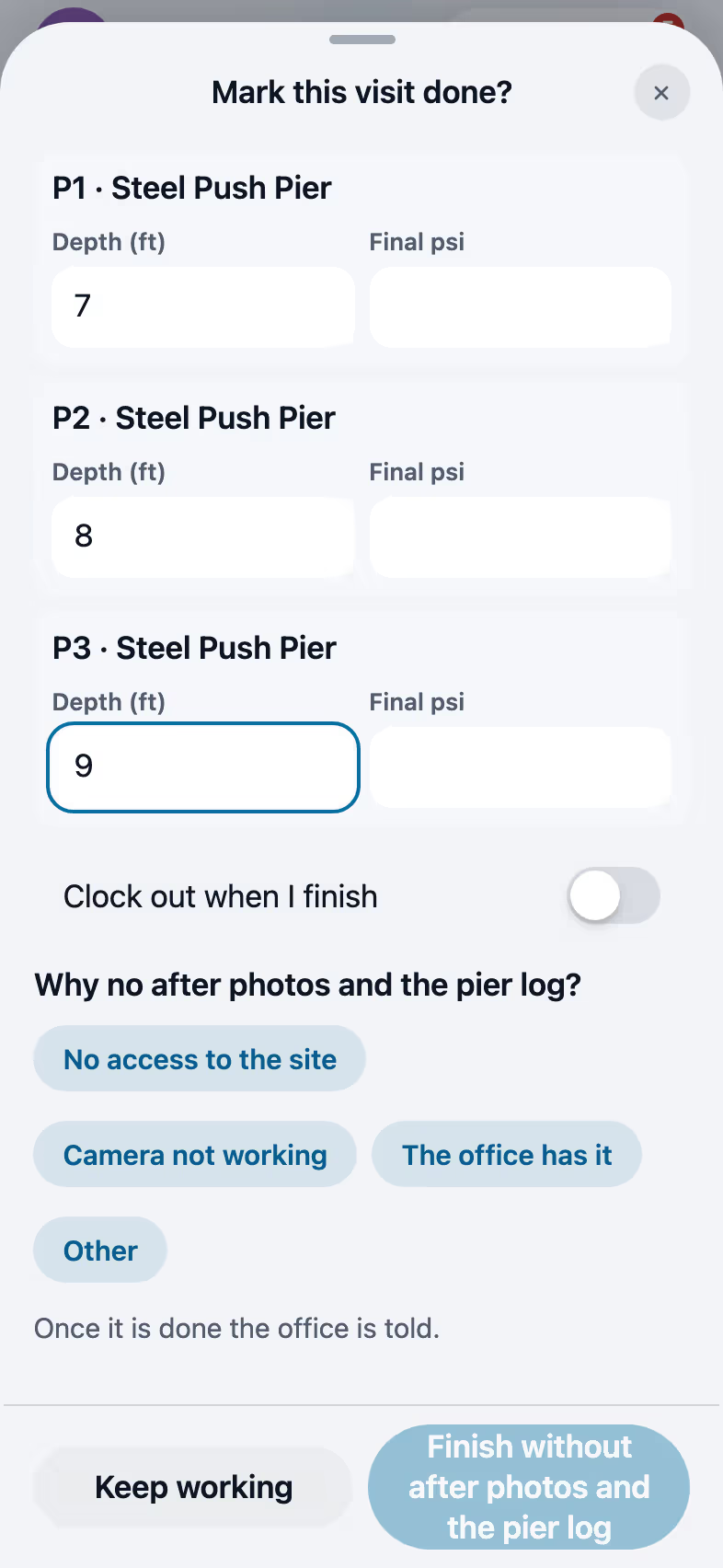
Mark done opens the close-out with after photos and the install log prefilled from the proposal, here three steel push piers with their depth and final pressure. The last crew day moves the job to Final payment due.

Approve the time cards
The time clock shows the hours for today and the week, regular and overtime. The office approves time cards and exports them for payroll.

Recorded in FollowStack with demo data. Names, addresses and numbers are made up.
The guides for it
Each guide in the FollowStack manual is a few short steps with a screenshot.
- Schedule crews and dispatchCrews, crew visits on a schedule, the dispatch board, and the rain delay.4 min
- The field crew's day on the phoneToday's jobs, directions, On my way, the checklist, photos, the daily log and Mark done.4 min
- Your phone appHome, the time clock, tasks, More and weak signal.2 min
- Time clock and time cardsClock in and out on the phone, then approve the week and export it for payroll.3 min
- Close out the jobAfter photos, the pier log filled in from the proposal, and clock out, in one sheet.3 min
- Book a visit for a leadOpen times follow the address and each inspector's day. Two or more inspectors can share one visit.3 min
- Connect Google Calendar or OutlookEach person connects their own calendar so their visits show up there too.2 min
- Work through your task listTap a task and it offers to call, text, book or send. It keeps reminding until it is done.2 min
Keep going
Crew leads
The crew's day in order, clock in together, log the work and close it out.
See the stepsThe field crew
Today's jobs, the time clock and the camera, in the crew's own language.
See the stepsThe office team
One inbox, formatted emails and templates, the calendar, invoices and tasks that close themselves.
See the steps
See FollowStack on one of your own jobs
Bring an address you're bidding this week. We'll draw it and price it with you, live on the call.