Company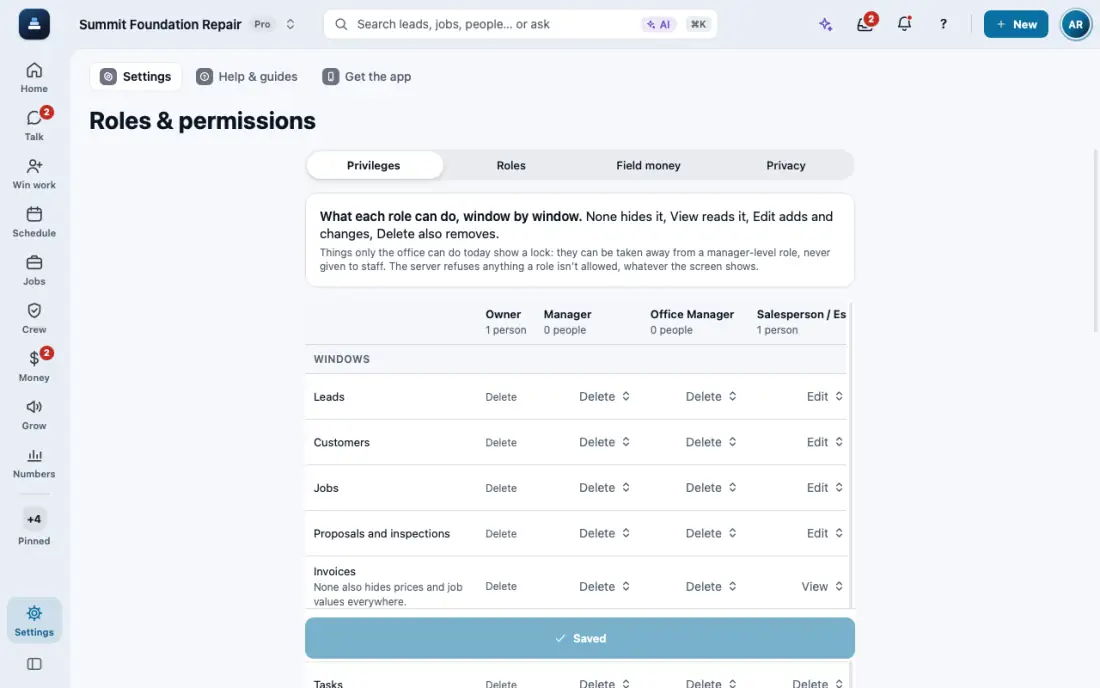
Choose what each role can see and do
None, View, Edit or Delete for each screen and action, checked by the server. Make your own roles.
Steps
Open Settings, then Roles & permissions. It opens on Privileges.
Pick a role and set each window to None, View, Edit or Delete. Actions and workflows are set the same way.
For example, keep prices from crews. Field Crew sees proposals and prices but cannot change, send or share them.
For a foreman, pick Foreman in Team members. He sees only the jobs he is on and the drawings of those jobs, with every price hidden. He never sees leads, the customer list or other jobs’ drawings.
Who gets each alert is in Settings, then Notifications.
In the app, open Help & guides and tap Show me: FollowStack points at each button as you go.
Related guides
- See who is selling and pay commission
- Run reports and send them to your team and your CPA
- Your plan, credits and seats
- Set up templates and custom fields
- Connect your services
- Use FollowStack from Claude or ChatGPT
- Find anything from the search bar
- Ask FollowStack to find, change or count anything
- Use FollowStack in Spanish
- Change your password
- Download all your company data
- Get help from the FollowStack team