Turn on what is worth having
One page with a switch for each feature most companies want on, and a shortcut to the rest.
Steps
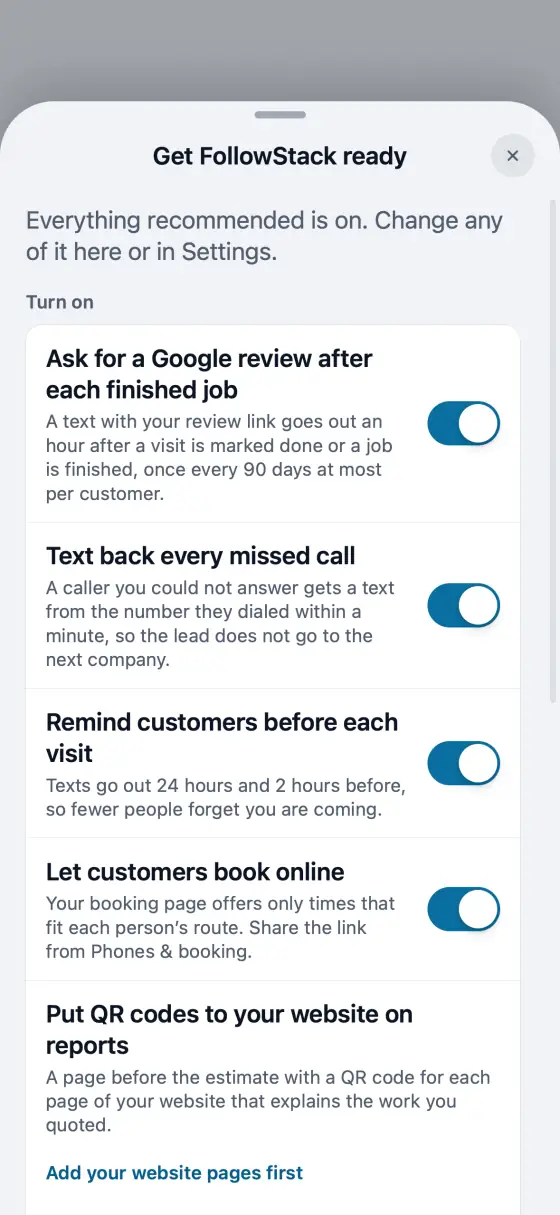
Open Settings and tap Get FollowStack ready, the first row. A card on Home opens it too while something is off.
Flip a switch to turn a feature on with good defaults: Google review requests, missed-call text-back, visit reminders, online booking, website QR codes on reports and the recorded-call notice.
Review requests need your Google review link. If it is missing, the switch asks for it right there.
Under Set up in a minute, each row opens the exact setting and highlights it: reviews on proposals, deposits, your phone greeting, extensions, holidays and the website chat.
Looking for something else? Type it in the Search settings box in your own words: a typo, Spanish or another name for it (VAT, down payment, voicemail) finds the setting.
In the app, open Help & guides and tap Show me: FollowStack points at each button as you go.