A contractor customer portal your customers open from one link
FollowStack's contractor customer portal holds proposals, invoices, photos, the 360 tour and the 3D view. It carries your brand and needs no password.
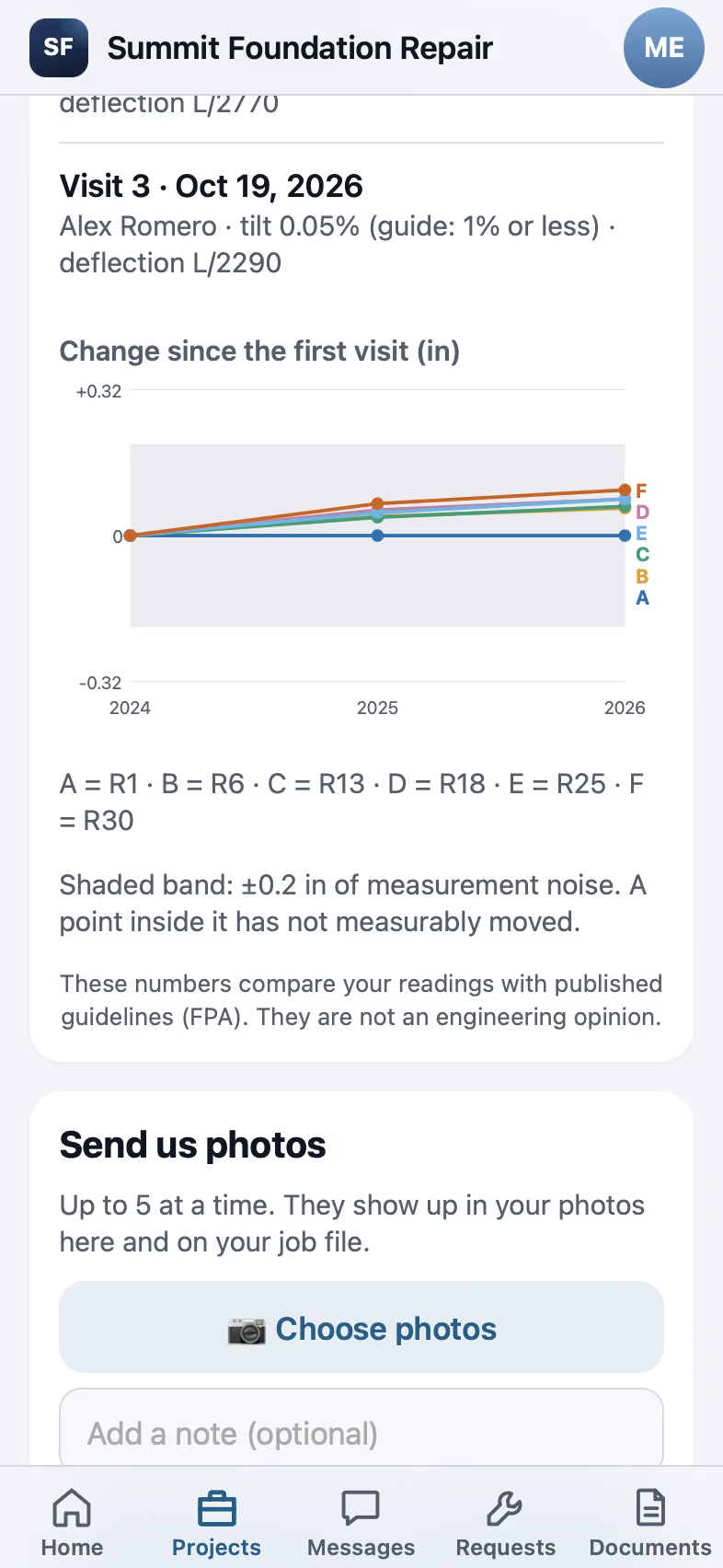
What the customer sees in the portal
The portal shows projects, proposals, invoices with a Pay button, documents to sign and job photos. It opens from a link, in the customer's language. With one sign-in turned on, a customer of several FollowStack companies that turned it on too opens each portal without another code.
- Customer portal
A magic-link portal with projects, proposals, invoices with Pay, documents, job photos, the 360 tour and 3D links, in the customer's language.
- Spanish for customers
A customer who writes Spanish gets booking texts, auto-replies, financing links, signed PDFs and every customer page in Spanish.
- One sign-in across portals
Off until you turn it on. A customer who uses several FollowStack companies that turned it on signs in once and opens each portal, and each company still shows only its own work.

Jobs you share with property managers and investors
Connect with a property manager, investor or realtor by code and share a job. They see its progress, the photos you marked for the customer and the estimates you sent, never your costs or notes. Their requests land as new leads, and their approvals post to your job.
- Connected companies
Connect with a property manager, investor or realtor by code and share a job. They see its progress, the photos marked for the customer and the sent estimates live, send you requests that land as leads, and approve estimates, asking the owner first above their limit.

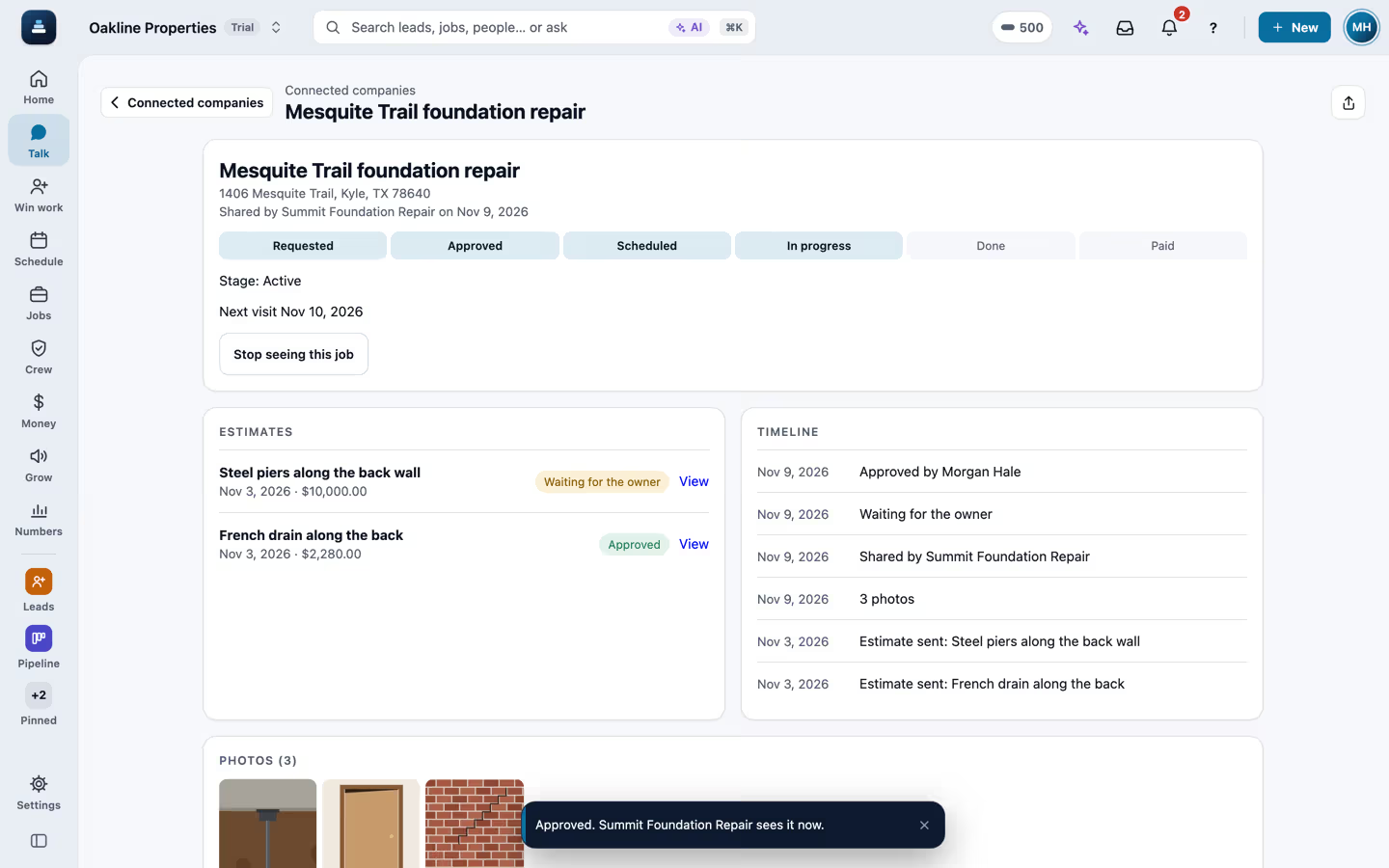
A job a contractor shares with a property company
A property company opens Connected companies, where a foundation contractor shared two jobs. The Mesquite Trail job shows the six steps up to In progress, the next visit, two estimates and the photos marked for the customer. The pier estimate is over the $5,000 owner approval limit and waits for the owner, and Approve on the drain estimate puts the approval on the contractor's job right away. The companies, people and numbers are made up.

A request sent to a connected contractor
On a property's page, the jobs a connected contractor shared show with a Send a request button. The request says what the job is, keeps the address and adds the on-site contact and the access notes, and Send puts it in the contractor's FollowStack as a new lead. They see the contact and access notes only while the request is open.
Properties and units for property companies
A company that signs up as Property management starts with Properties and Connected companies pinned. It brings in its buildings and units from a spreadsheet, keeps each property's details and insurance, tracks every unit's rent and status, and groups properties into portfolios.
- Property and unit import
Bring in buildings and units from a spreadsheet. Unit lists exported from AppFolio, Buildium, Rent Manager and Yardi work, and importing the same file again never adds anything twice.
- Property details and units
Each property keeps its type, status, year built, size, parcel, insurance with its end date and notes, and each unit its beds, baths, size, market rent and status.
- Portfolios
Group properties by owner or LLC. A portfolio's page adds up its properties, units and vacant units.

Buildings and units brought in from a spreadsheet
A property company opens Properties and taps Import a spreadsheet. A unit list of 14 rows matches its columns by itself, from the property and street to the unit, bed and bath, size, market rent, status and portfolio. The test run saves nothing and shows 4 buildings and houses, 12 units and 2 portfolios, and Import brings them in. Properties then shows each building with its units and vacant units, and the two portfolios. The company, addresses and numbers are made up.
Repair requests from tenants
Tenants report a problem from their portal with photos, the unit, whether you may go in and their pets. Possible emergencies are flagged for the office to confirm, repairs over the owner's approval limit wait for the owner's OK, and the crew or a vendor sees the unit's lockbox code only on the day of the visit. Vendors who don't use FollowStack work the job from a link. A repair can also go to a connected company on FollowStack, which sees the photos and how to get in only while the request is open.
- Tenant repair requests
Tenants report a problem from their portal in under a minute, with photos, the unit, whether you may go in and their pets. Words like flooding, gas smell or no heat flag a possible emergency for the office to confirm.
- The owner's approval limit for repairs
A repair over the owner's approval limit waits for the owner's OK, by a link they approve in one tap or by phone. An emergency the office confirmed goes ahead.
- Lockbox codes on the day of the visit
Each unit keeps its access notes and lockbox code. The crew or a vendor sees them only on the day of the visit, every view is logged, and owners and managers see who has seen it.
- Vendor job links
Send a repair request to a vendor who isn't on FollowStack. They open it without an account, accept, pick a time, see the code on the day, and send photos, a quote and their invoice. The link expires on its own.
- Repairs sent to a connected company
Send a tenant's repair request to a connected company on FollowStack. They see the photos and how to get in only while the request is open, and every lockbox code view alerts you.

A tenant reports a leak from the portal
Jamie, a tenant at Pecan Grove Apartments, opens the Oakline Properties portal on a phone and taps Report a problem. They pick Plumbing leak, write that water is leaking under the kitchen sink and the floor is flooding, add a photo, say the office may go in when nobody is home and mention a friendly cat. Send files it as request SR-1001 on unit 104, and the words mark it a possible emergency for the office to confirm. The company, the people and the address are made up.

A vendor works a repair from a link
Oakline Properties sends request SR-1001 to Hill Country Plumbing, a vendor who does not use FollowStack. The plumber opens the link on a phone, with no account, and sees the leak at unit 104, the tenant's first name and phone, how to get in, the pets and the tenant's photo. They accept, send a $380 quote and set the visit for 2:30 pm today. It is the day of the visit, so Show the access notes and code shows the lockbox code, with a note that each view is logged. They add a photo of the fix, mark the job done and send the invoice. The companies, the people and the address are made up.
A 360 tour and 3D view from home
360 photos pinned on the plan become a tour with hotspots room to room. The 3D link shows the plan and the repair. Both links expire and can be turned off.
- 360 tours
360 photos and videos pinned on the plan with a direction arrow, hotspots room to room, a mini-map, and customer tour links that expire.
- 3D view and customer 3D link
One tap shows the drawing in 3D, live from 2D; a customer 3D link that expires and can be revoked; AR / GLB export.

A Field CAD plan in 3D
A Field CAD plan with its rooms and their square footage opens in the editor. One tap on 3D builds the model from the same drawing, and a drag turns it around.
Review requests done the right way
Survey-first review requests show every customer the same review buttons, whatever they answer. There's no review gating and no reward for a review.
- Survey-first review requests
Every customer sees the same review buttons whatever they answer, never twice in 180 days.

Reviews and referrals
Reviews and referrals shows the review request for a customer, the switch to ask after every finished job, how the review engine works, the referral program with its reward per signed job, and the review widget for your website.
See it in use
The customer portal and payments
A portal for each customer, signatures on the phone, deposits and invoices.
See the stepsProperty managers
Buildings and units from a spreadsheet, tenant repair requests, vendors by link, owner approvals and live jobs from contractors.
See the stepsReal estate agents
A LiDAR floor plan, 360 tours, listing-prep notes and showings booked for you.
See the steps
User guides for customer portal
- Give customers a branded portalA magic-link portal with projects, proposals, invoices with Pay, documents and photos.3 min
- Get the proposal signedThe customer signs from a link. The proposal turns Signed right away and the signed copy reaches them.2 min
- Send invoices and collect paymentsSend invoices with a pay link, connect Stripe, and chase what is overdue.3 min
- Ask for reviewsA short survey first, then the same review buttons for everyone. Never twice in 180 days.3 min
- Get referrals with a link and a QR codeEach customer or partner gets a link. Whoever books through it is credited to them, with the reward you set.2 min
- Give the homeowner a home record packetThe install log, plan pins, photos and movement history, ready to hand a buyer.3 min
See FollowStack on one of your own jobs
Bring an address you're bidding this week. We'll draw it and price it with you, live on the call.