See how your customers engage and how fast your team reaches them
Reports under Customer engagement: minutes to the first reply for every new lead, how fast each side answers, every text, email and call, what customers opened, your sales funnel, the best time to reach them, how they pay, and reviews and referrals.
Steps
Open Reports and find Customer engagement.
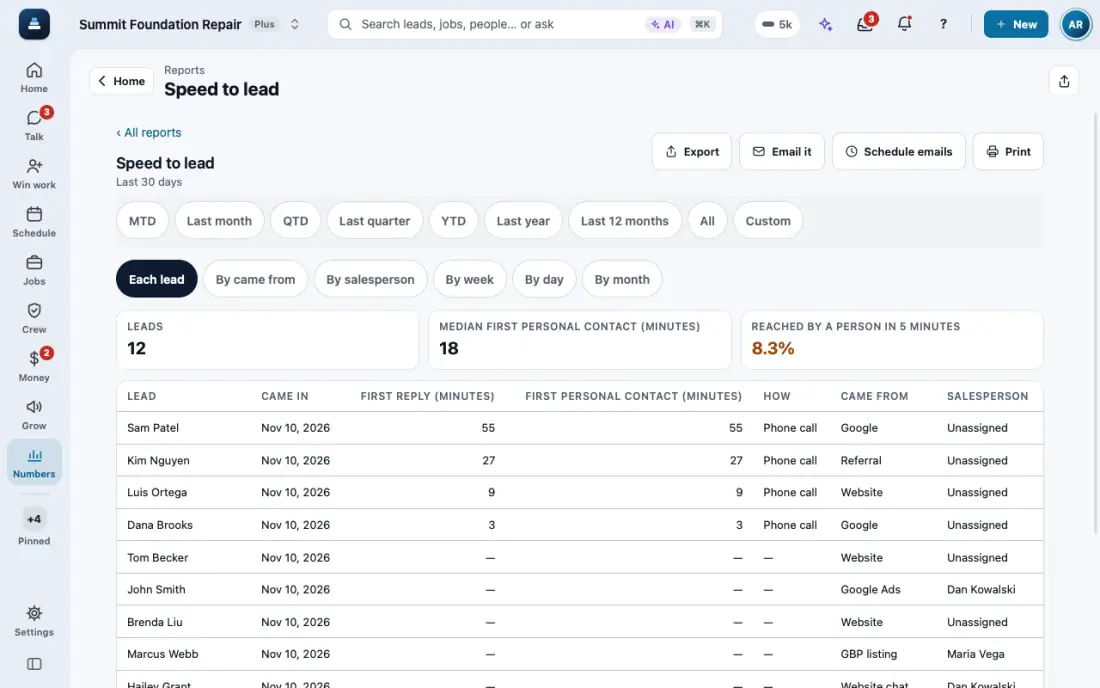
Speed to lead lists every new lead with the minutes to your first reply and to the first personal contact, and how it happened. Group it by where leads came from or by salesperson to see who calls back fastest.
Response times shows how fast your team answers a customer's text, email, chat or call, how fast they answer you, and what nobody answered. An automatic text is not an answer.
Texts, emails and calls counts everything both ways by week, day, month or salesperson, with what was delivered and the calls you missed.
Customer engagement lists each lead and customer with the times they opened what you sent, the times you contacted them and the times they reached out. Document opens shows which proposals, reports and invoices were opened, how often and on what device.
Sales funnel follows new leads through contact, visit, proposal, opened and signed. Best time to reach shows the days and hours customers are around. How customers pay (owners and managers) shows days from invoice to payment, and Reviews and referrals the survey scores and referrals won.
They export, email and schedule like every report. Someone who sees only their own leads sees only those. A lead's Insights shows the same numbers for one person.
In the app, open Help & guides and tap Show me: FollowStack points at each button as you go.
Related guides
- Get referrals with a link and a QR code
- Give customers a branded portal
- Give your customer their portal
- Give the homeowner a home record packet
- One sign-in for all of a customer’s portals
- Talk with customers in Spanish
- See what your customers read and what held them
- See where customers tap, replay their visits and watch your numbers