How the office runs the day in FollowStack
The office answers customers, books the visits, sends the invoices and keeps the tasks moving. Everything lands in one inbox and one calendar, so nobody keeps a second list.
Step by step
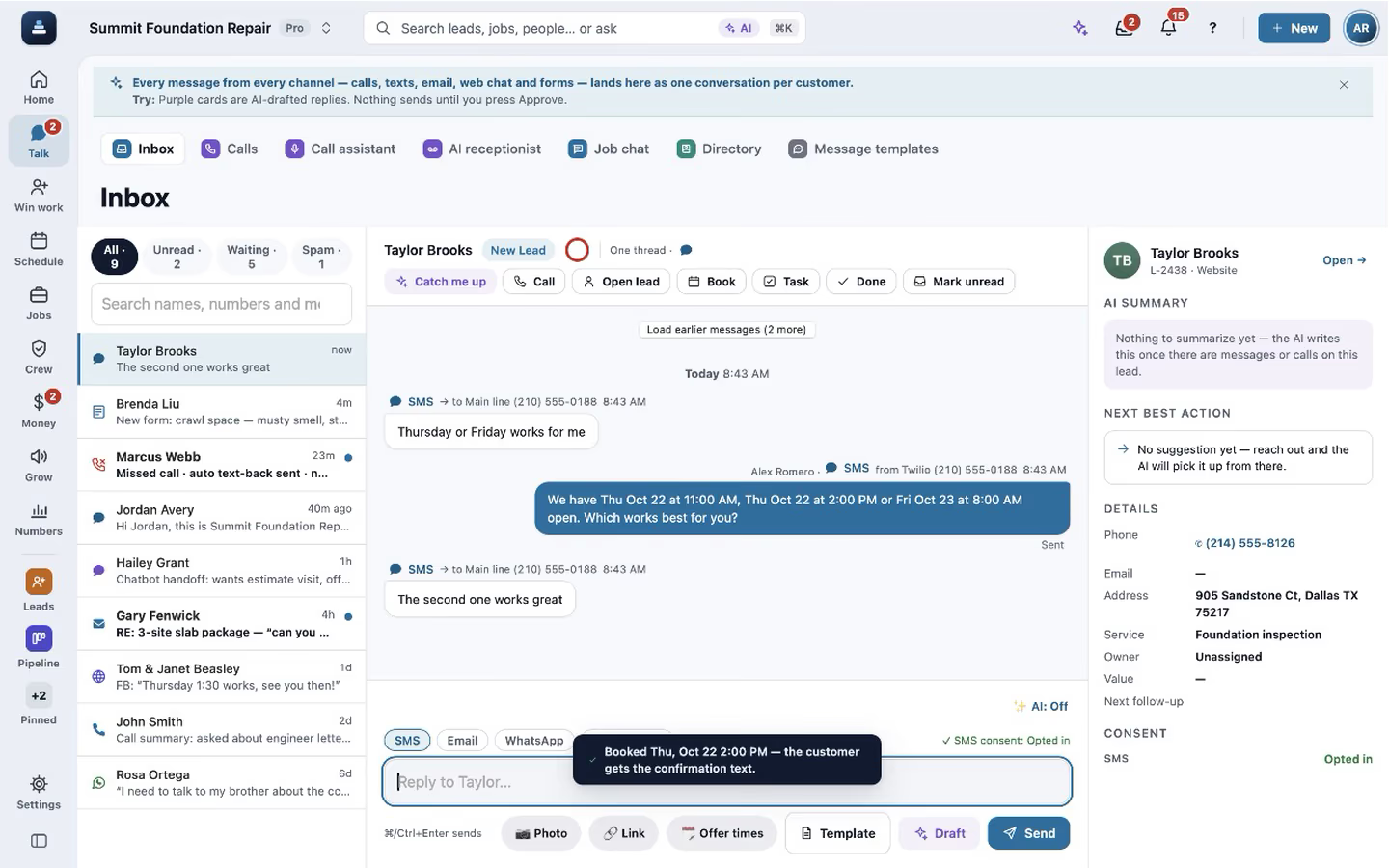
Answer from one inbox
Texts, calls, web chat and form leads sit in one list by customer, each with a suggested reply that waits for your tap.

Set aside spam and leads that aren't worth it
Mark a lead Spam or Not worth it with a reason, one or many at once, and Undo puts it back. Spam can block the sender. Every lead also gets an automatic score with a plain reason, and a lead outside your area is only flagged, never sent to Spam on its own.

Write emails that look designed
Email has a formatting bar like a document: headings, bold, colours, lists, pictures you pick, paste or drop in, buttons and divider lines. Paste from Word or Google Docs comes in clean, the signature goes out with your logo, and drafts save as you type.

Templates that fill in each customer
An email template fills in the customer's first name, the next visit's date and time and the proposal link, with the words to use when a field is blank, like "there". It has its own preview line and a Spanish version that customers who prefer Spanish get on their own. Preview it with a real customer before you use it.

Book the visit near the address
Open times come from where your people already are that day. The calendar shows appointments, tasks, invoices due and permits.

Keep the tasks moving
Tasks offer to call, text, book or send right from the list. They count tries, remind on time and close themselves when the real thing happens.

Send invoices and collect
Invoices go out by text and email with a link to pay when payments are connected. Outstanding and overdue totals sit at the top, and payments export for QuickBooks.

Recorded in FollowStack with demo data. Names, addresses and numbers are made up. The AI words come from a test stand-in, written the way the real feature drafts them, and no real texts, calls or emails were sent.
The guides for it
Each guide in the FollowStack manual is a few short steps with a screenshot.
- Work every conversation from one inboxCalls, texts, picture texts, email and web chat on one thread per customer.3 min
- Mark spam and leads not worth itPut junk and leads you will not work with out of the way. Nothing automatic goes to them, and the spam check learns from your marks.3 min
- Make email templates with fields and a Spanish versionWrite a template once, with the customer's name, their visit and their proposal link filled in for each one.3 min
- Offer open times and book from a textPut real open times in the text. When they pick one, book it in one tap.2 min
- Book a visit for a leadOpen times follow the address and each inspector's day. Two or more inspectors can share one visit.3 min
- Connect Google Calendar or OutlookEach person connects their own calendar so their visits show up there too.2 min
- Work through your task listTap a task and it offers to call, text, book or send. It keeps reminding until it is done.2 min
- Send invoices and collect paymentsSend invoices with a pay link, connect Stripe, and chase what is overdue.3 min
- Take a deposit and invoice the balanceA deposit at signing, the balance at completion, and nothing slips.4 min
- Set quiet hours and texting consentWhen automated texts wait, and who never gets them.2 min
- Bring your customers and prices overImport a CSV from your old system: customers, projects, open invoices and your price book.6 min
- Ask for reviewsA short survey first, then the same review buttons for everyone. Never twice in 180 days.3 min
Keep going
Texting and the digital receptionist
One inbox for texts, calls and chat, calls that book the visit, and a receptionist that answers when nobody can.
See the stepsThe customer portal and payments
A portal for each customer, signatures on the phone, deposits and invoices.
See the stepsCrews and scheduling
The office books the crews, and the crew runs the day on the phone.
See the stepsExport any list
Every list exports the way you filtered it, to Excel, Word, PDF or CSV.
See the steps
See FollowStack on one of your own jobs
Bring an address you're bidding this week. We'll draw it and price it with you, live on the call.