Texting and the digital receptionist
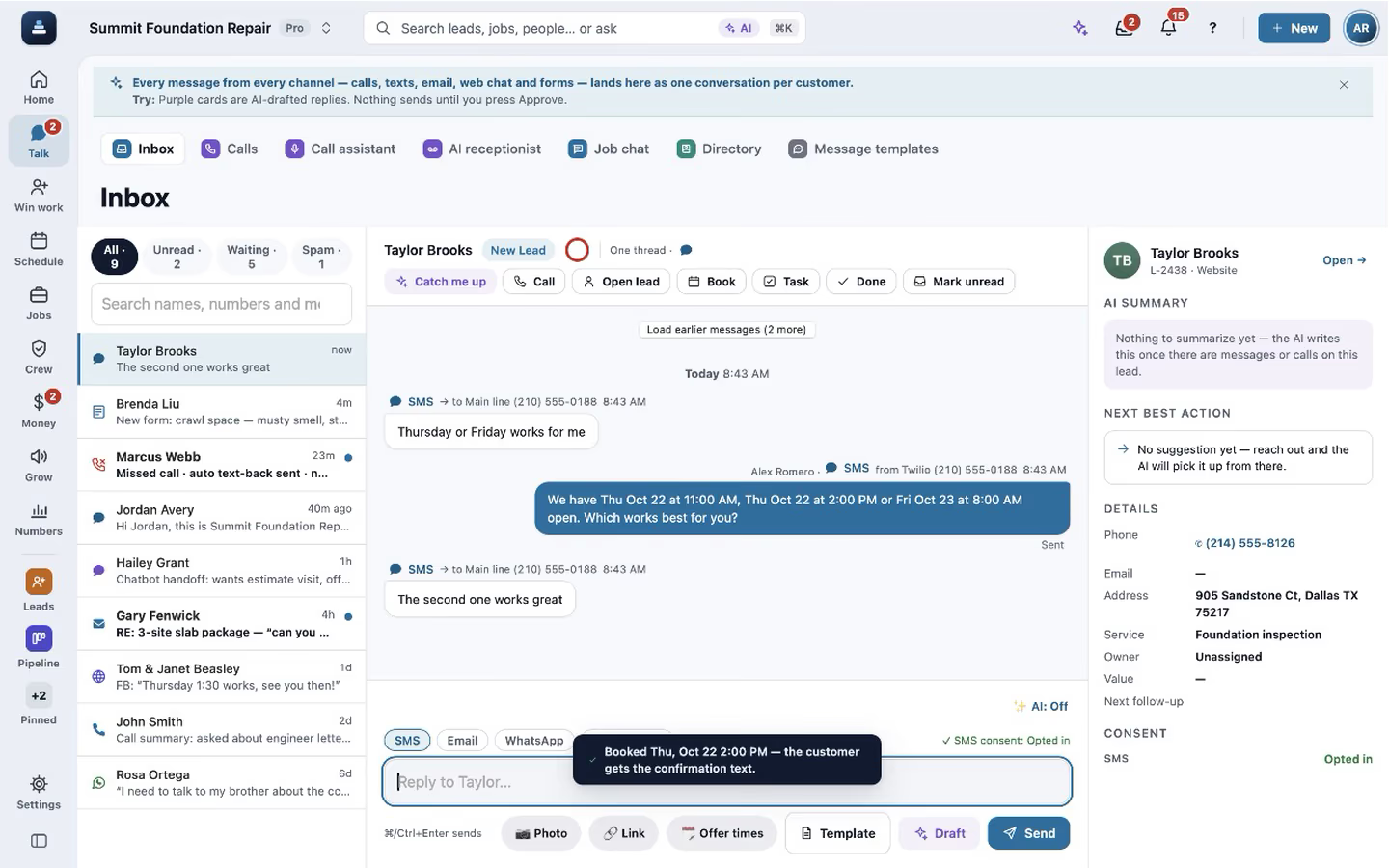
Texts, calls, web chat and lead forms land in one inbox, by customer. A suggested reply is ready when you open a thread, and the digital receptionist, an AI that answers your business line, picks up after hours or when nobody else can.
Step by step
Work every conversation from one inbox
Each thread shows the customer's details, the lead, the visits and a short summary beside the messages. Missed calls, texts, chat handoffs and form replies sit in the same list.

Let the AI write the reply
The suggested reply is written from the thread and your company's facts, and it is never sent until you tap Send. You choose in Settings how replies work in the Inbox. It never asks a lead again for what their form already gave, like the address or the name.

Offer times and book from the thread
Offer times puts open slots near the customer's address into the text. When they answer with one, Book puts it on the calendar and the confirmation text goes out.

Let the digital receptionist answer
Pick when it answers: after hours, when a call goes unanswered, or always on a tracking line. It asks for the address first, books visits on the right person's calendar, never quotes a price and hands off only to someone who speaks the caller's language.

Calls ring in the app
Go online and calls ring on the computer or in the iPhone app. Every call is recorded with notice, transcribed live and summed up on the lead's thread, and missed calls get a text back. When you answer, the live transcript opens by itself.

A call that books itself
When you and the caller clearly agree on a time, the lead and the visit are created by themselves. The customer hears nothing until you tap Send confirmation, and Undo is right there. A time that only came up stays a one-tap suggestion.

Recorded in FollowStack with demo data. Names, addresses and numbers are made up. The AI words come from a test stand-in, written the way the real feature drafts them, and no real texts, calls or emails were sent.
The guides for it
Each guide in the FollowStack manual is a few short steps with a screenshot.
- Work every conversation from one inboxCalls, texts, picture texts, email and web chat on one thread per customer.3 min
- Let the AI write a reply for youSay what the message should do. The AI writes it to fit the conversation, and nothing goes out until you tap Send.2 min
- Choose how AI replies in the InboxOff, Suggest or Auto-reply. Drafts use your real facts and never claim a booking.3 min
- Offer open times and book from a textPut real open times in the text. When they pick one, book it in one tap.2 min
- Let the digital receptionist answerIt answers, asks for the address first, books on the right person's calendar and never quotes a price.4 min
- Set up how calls are answeredAnswer modes, ring order, recordings and the missed-call text.4 min
- Get your business phone numberSet up a FollowStack number with texting, or connect the Twilio account you already have.5 min
- Turn on missed-call text-backA caller you missed gets a text from the number they dialed within a minute.2 min
- Set quiet hours and texting consentWhen automated texts wait, and who never gets them.2 min
- Add a tracking numberA number per ad or source, so you see which one rings.3 min
- Talk with customers in SpanishA customer who writes Spanish gets texts, booking, links, signed PDFs and the portal in Spanish.2 min
Keep going
The office team
One inbox, formatted emails and templates, the calendar, invoices and tasks that close themselves.
See the stepsOwners and managers
Home, the money, who is selling, which sources send junk, and an assistant that asks before it changes anything.
See the stepsA call turned into a signed proposal
The missed call gets a text, the visit is booked near the address, and the proposal is signed on site.
See the steps
See FollowStack on one of your own jobs
Bring an address you're bidding this week. We'll draw it and price it with you, live on the call.