Track safety talks, incidents and equipment
Toolbox talks with crew signatures, incident reports from the phone, and logs for trucks and machines.
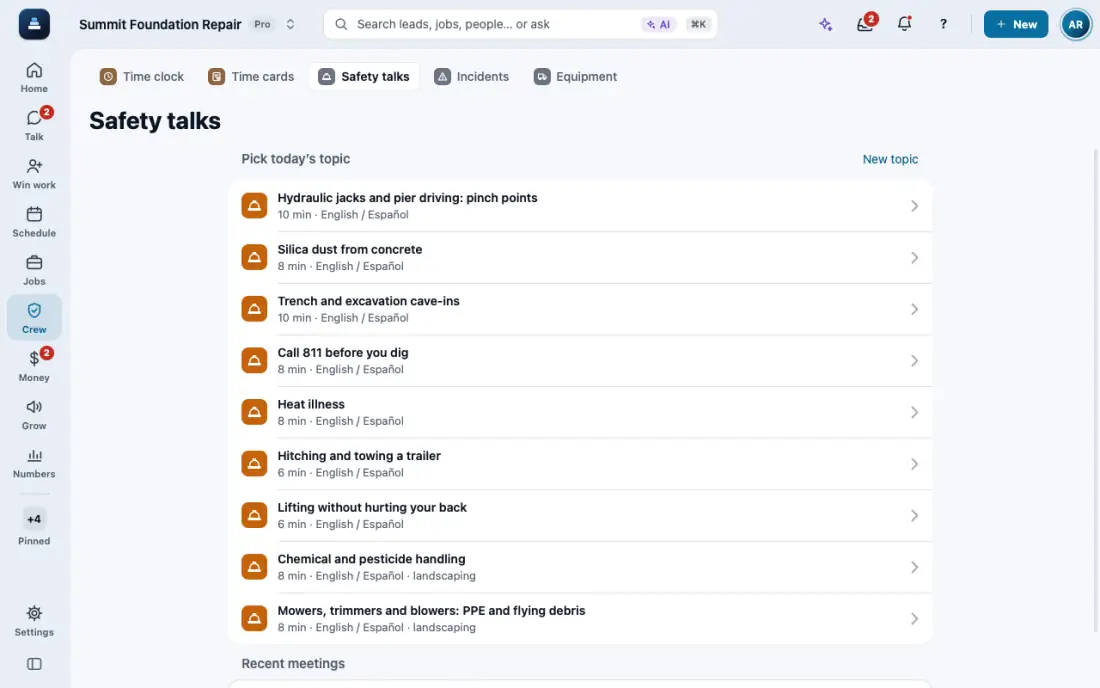
Steps
Open Safety talks and pick today's topic. Read it out loud, in English or Spanish.
Tap Pass the phone to sign. Each person taps their name and signs. Then tap Save meeting. The attendance PDF stays in Recent meetings.
Something happened on site? Tap New, then Report incident: what happened, photos and who was involved. A serious one alerts the owners right away.
The office opens Incidents to set the status, the root cause and the tasks to fix it, and to save the PDF report.
Open Equipment and tap Add equipment for each truck or machine. Service due and papers about to expire show as badges.
Open a truck or machine and tap Log for fuel, hours on a job, a repair or service. Whoever drives an assigned truck taps Start pre-trip on Home.
In the app, open Help & guides and tap Show me: FollowStack points at each button as you go.
Related guides
- The field crew's day on the phone
- Your phone app
- Close out the job
- Make a change order
- Permits, inspections and punch lists
- Track what a job costs
- Handle service calls and maintenance plans
- Give jobs to subcontractors at their rates
- Send a request to a vendor with a link
- Handle repair requests from tenants
- Set up your properties, units and portfolios
- Keep soil reports, permits and site facts on a property
- Share a job with a property manager or investor
- Send requests to your pros and approve their estimates