Financing, payment plans and milestone billing
"As low as" monthly prices from your lender, installments on a saved card, bills as the job moves, and a service fee on online payments.
Steps
Turn on what you use in Settings, then Features: Customer financing, Payment plans, and Estimates & milestone billing.
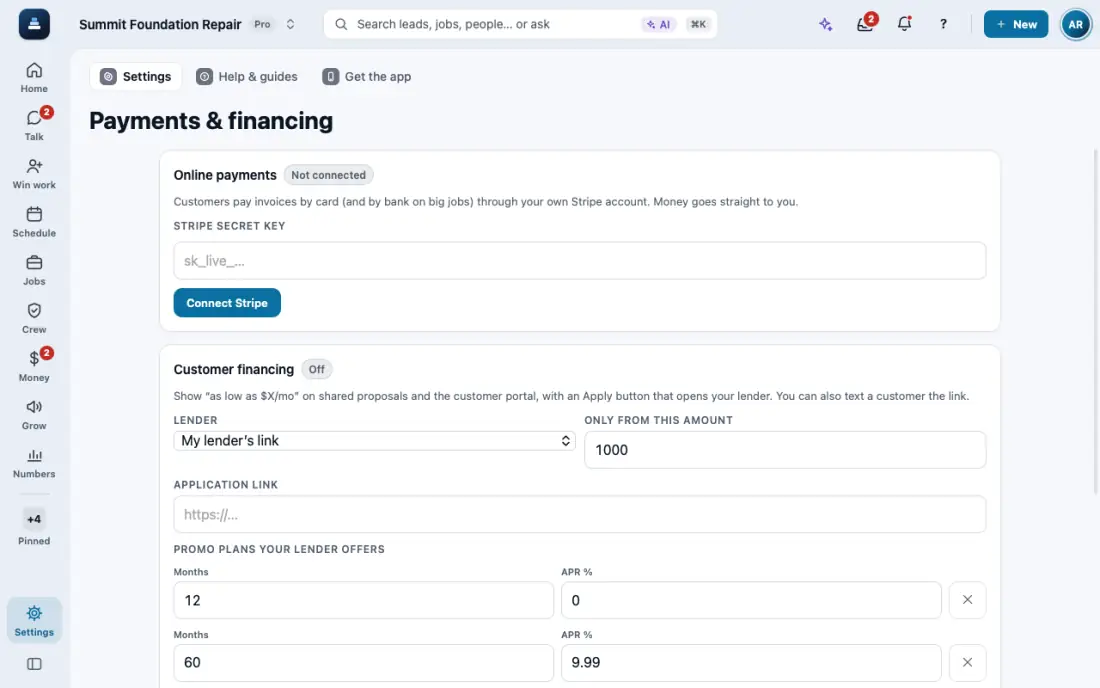
For financing, open Payments & financing, paste your lender's link and its plans, then Save financing. Proposals show an "as low as" monthly price.
To pass on what Stripe costs you, set Service fee on online payments in Payments & financing, add how else customers can pay (check, Zelle, bank transfer) and Save service fee. Every payment through Stripe, card or bank, then shows the fee before paying and on the receipt; checks and transfers have none. On a bill with a discount, the fee comes out of the discount instead (4% of the amount paid, by default). Above 3% you confirm a warning once: card networks cap card surcharges at 3% and debit cards can't be surcharged. A refund gives back its share of the fee. Your Collect payment links carry the fee too (the message you send says so), and a payment plan shows each payment's fee before the customer saves a card. Or ask the AI to set the fee or quote what a customer pays online vs by check. Above 3% it shows the same warning first.
On a lead, Send financing link sends the application. Applications are tracked as Open or Funded.
Milestones bill as the job moves: deposit, work begins, completion. Payment plans charge the customer's saved card on each date.
In the app, open Help & guides and tap Show me: FollowStack points at each button as you go.
Related guides
- Send an inspection report or proposal
- Choose who the contract is made out to
- Copy or delete a proposal from the lead
- Present the proposal at the kitchen table
- Let FollowStack learn how you work
- Follow up when they read the proposal
- A fine foundation, drainage work or a repair
- Add your pier products
- Offer three price options
- Get the proposal signed
- Send the welcome email
- Build the insurance package