Choose who the contract is made out to
Pick the owner, a co-signer or someone who only reads it from the people on the job. The proposal stays on its lead.
Steps
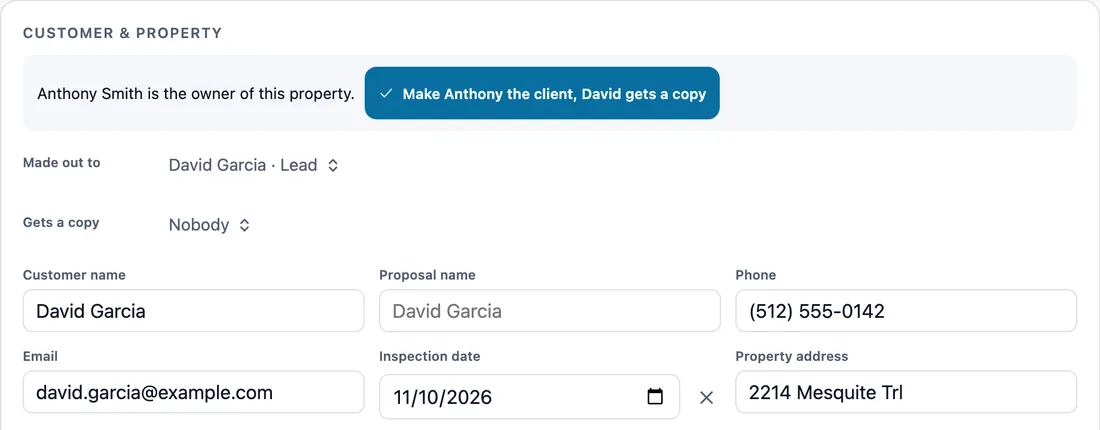
Open the proposal. Under Customer and property, Made out to lists everyone on the job: the lead or customer, and the people linked to the property with their role, like Luis Moreno, Owner.
Pick a person. Their name, phone and email fill the contract, and Send goes to them. The proposal and its job stay on the lead, and it also lists on the page of each person on it. What was sent to them shows in their own messages and history. The lead gets no automatic estimate texts or emails for it. When their own address is not the job's, it fills Mailing address, which prints under their name on the contract. Someone else… lets you type a name instead.
Tom called, but Luis owns the house? Link Luis to the property as its owner first. The proposal then offers one tap: Make Luis the client, Tom gets a copy.
Gets a copy is for people who read it and never sign, like a realtor or the person who called. When you send the proposal, each one gets a copy by text or email from their record, on a link that cannot sign. The contract lists them by the signatures as Copy to, for information only.
Two owners must sign? Open Co-signers and pick the other owner. Each one gets a signature line and initials, and they sign one after another, each on their own link. When it is their turn, Text it or Email it next to their name sends their link.
When Luis signs, he becomes the job's customer, and the job stays on Tom's lead. Once it is signed, the people on it are locked. While co-signers are still signing, changing who is on it means everyone signs again, so the app asks first.
Or ask the AI: “Make Luis the client on Tom Reyes's proposal and give Tom a copy.” It shows a card with every person and their part. Nothing changes until you approve it, and sending stays its own OK.
In the app, open Help & guides and tap Show me: FollowStack points at each button as you go.
Related guides
- Send an inspection report or proposal
- Get the proposal signed
- Ask FollowStack to find, change or count anything
- Use FollowStack from Claude or ChatGPT
- Copy or delete a proposal from the lead
- Present the proposal at the kitchen table
- Let FollowStack learn how you work
- Follow up when they read the proposal
- A fine foundation, drainage work or a repair
- Add your pier products
- Offer three price options
- Send the welcome email
- Take a deposit and invoice the balance
- Financing, payment plans and milestone billing
- Build the insurance package