Move leads from new to won
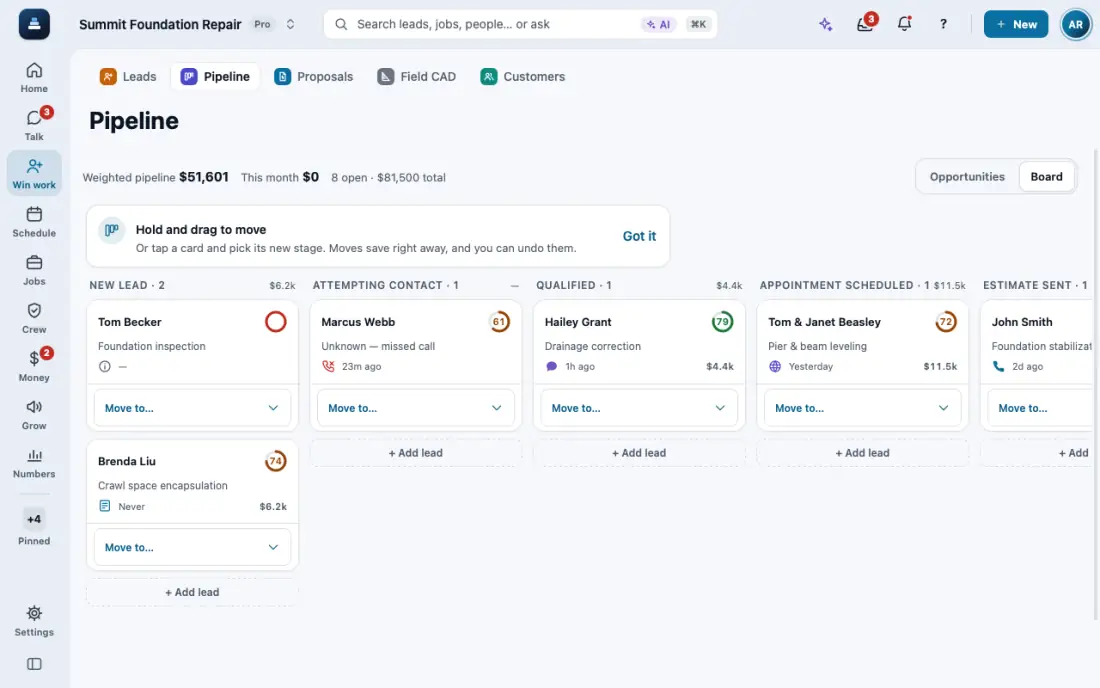
Every lead has a stage. Work the Pipeline board and never drop a follow-up.
Steps
Calls, texts and form submissions make a scored lead on their own. Find them in Leads.
Each lead has a score from 1 to 99 that moves with what it shows: contact details, a booked visit, a reply, urgency, how leads from that source usually end. The main reason shows under the score.
Pipeline shows deals as columns toward Won. Use the stage menu on a card to move it along.
To change the order, use the sort menu on the list (on a phone, tap the round filter button). Inspection date puts the next inspection first, then past ones, then leads with none. It works on Customers and Projects too.
To keep every follow-up, open the lead, tap Task and set when to call back. A missed day moves it to Overdue in Tasks and on Home.
In the app, open Help & guides and tap Show me: FollowStack points at each button as you go.
Related guides
- Change your pipeline stages
- Add a lead by hand
- Work through your task list
- Give every new lead an owner
- Mark a lead won or lost
- Mark spam and leads not worth it
- Leads from outside your service area
- See your leads and jobs on a map
- Get leads from your website and lead services
- Work every conversation from one inbox
- Let the AI write a reply for you
- Choose how AI replies in the Inbox
- Offer open times and book from a text
- Set up how calls are answered
- See every call and call back
- Turn on missed-call text-back
- Put your AI team to work
- Add a tracking number
- Let the digital receptionist answer
- Set quiet hours and texting consent
- Share your online booking page
- Book a visit for a lead
- Connect Google Calendar or Outlook
- Send a campaign
- Track commercial bids and accounts
- Make email templates with fields and a Spanish version