Get leads from your website and lead services
Forms, the website chat, and Angi, HomeAdvisor, Thumbtack, Yelp and Google, all landing as leads.
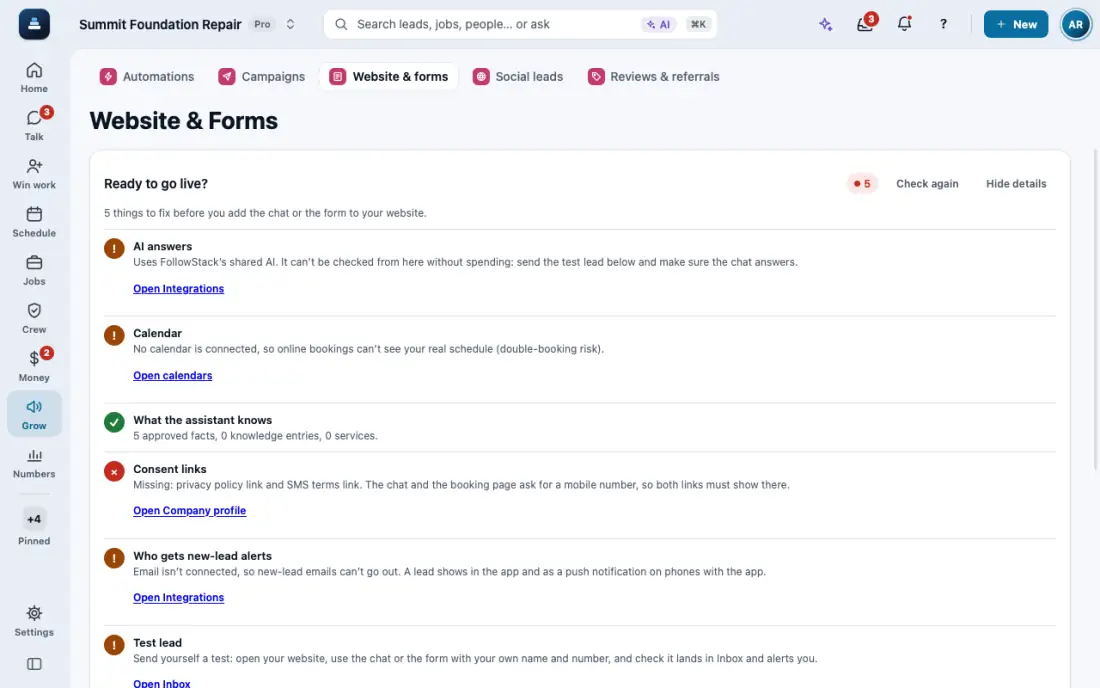
Steps
Open Website & forms. The Form builder, the Chatbot and the Booking page each make a lead in FollowStack.
Put the form or chat on your website with the embed code. The chat answers from your approved facts, in English or Spanish.
For lead services, open Integrations hub, then Lead vendors, and tap Set up on Angi, Thumbtack or the one you use.
The chat can greet visitors with a message card. Set your coverage area in miles north, south, east and west of your base, and only visitors inside it see the greeting.
Ad clicks are kept on the lead, so Analytics shows cost per lead and what each source turned into.
In the app, open Help & guides and tap Show me: FollowStack points at each button as you go.
Related guides
- Move leads from new to won
- Mark spam and leads not worth it
- Leads from outside your service area
- Give every new lead an owner
- See your leads and jobs on a map
- Mark a lead won or lost
- Change your pipeline stages
- Work every conversation from one inbox
- Let the AI write a reply for you
- Choose how AI replies in the Inbox
- Offer open times and book from a text
- Set up how calls are answered
- See every call and call back
- Put your AI team to work
- Add a tracking number
- Let the digital receptionist answer
- Set quiet hours and texting consent
- Book a visit for a lead
- Connect Google Calendar or Outlook
- Work through your task list
- Send a campaign
- Track commercial bids and accounts
- Make email templates with fields and a Spanish version